Video Marketing
Topview
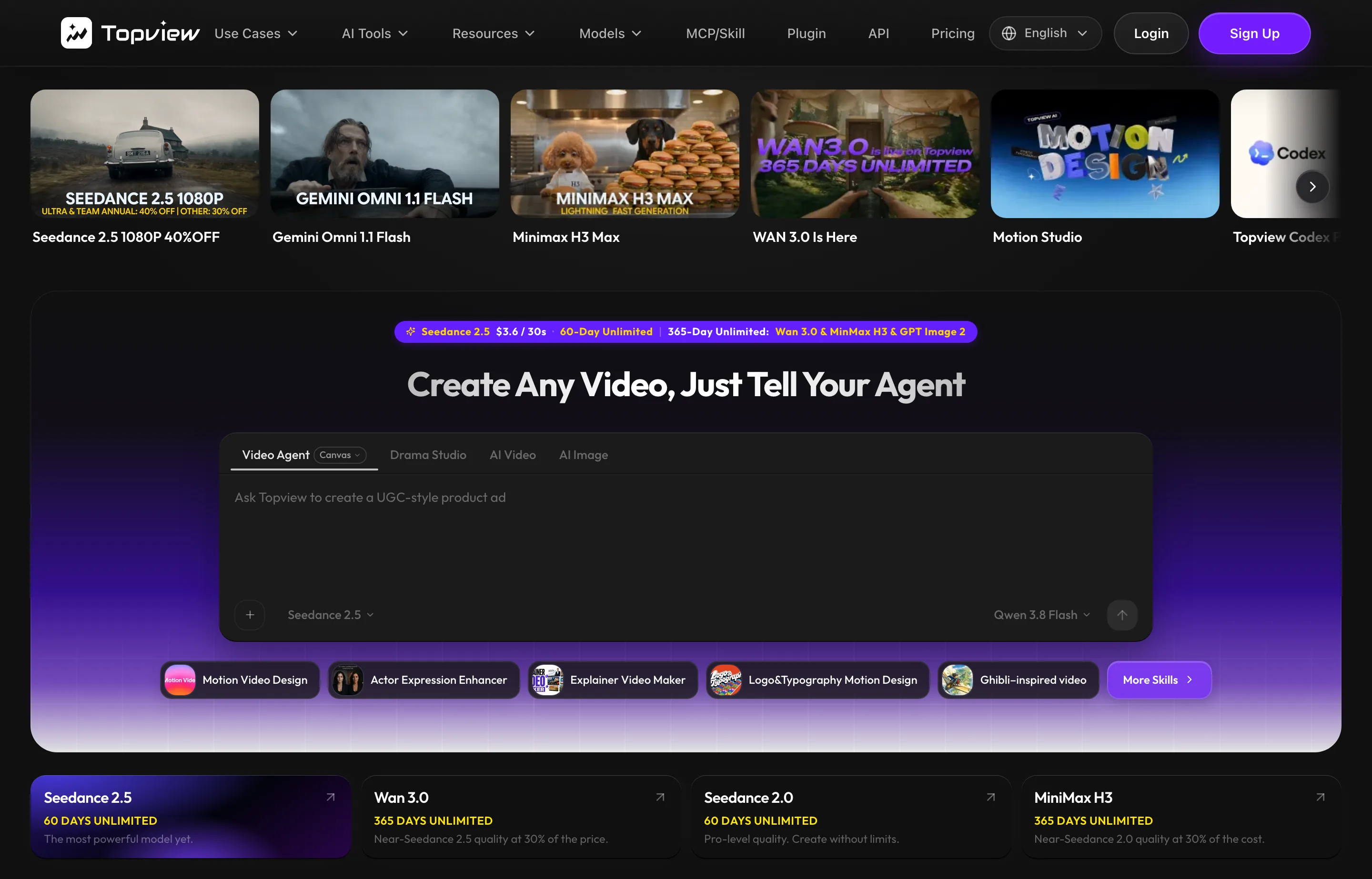
Topview is an AI video platform aimed squarely at marketing: it turns a product link or a prompt into ad videos, product videos, and UGC-style content, using a rotating lineup of generation models under one subscription. It is run by Topview Pte. Ltd., a registered company with offices in Singapore and Chino Hills, California. The current "Motion Studio" generation launched on 30 August 2026 and finished #1 of the day on Product Hunt with 324 points and 66 comments.
The thing to understand before paying is the pricing model: it is credit-based with aggressive limited-time promotions. Plans are framed as "up to 67% off" and bundle "365-day unlimited" access on selected models at certain resolutions, while every other generation burns credits whose per-second cost differs by model and resolution. The list prices below were displayed with those discounts already applied when we read the page.
- Website
- topview.ai
- Category
- Video Marketing
- Pricing
- Paid
- Starts at
- From $16/month billed annually; $29 monthly
- Best for
- E-commerce and DTC small brands that need product and ad videos every week without hiring an editor or learning After Effects.
- Profile updated
- September 1, 2026
Independent profile — no affiliate links or sponsored placement.
Key features
- URL-to-video: paste a product link and get an ad or product video assembled from it
- Product avatars and AI presenter avatars, with voice cloning and lip-sync
- UGC-style ad videos for TikTok and short-form placements
- Access to multiple generation models (Seedance, Kling, Veo, and Nano Banana image models were listed when we read the page) under one plan
- TikTok Ad Library browsing inside the product for ad research
- Watermark-free exports on paid plans; commercial license included
- API and MCP access on qualifying plans for automating video creation
- Motion graphics and editor on a timeline, not just one-shot generation
Pricing
Read from Topview's pricing page on 1 September 2026 — the page was full of limited-time discount framing, so treat every number as promotional and verify before purchase:
- Pro — $16/month billed annually ($192/year), or $29 monthly: 960 credits per year upfront (~640 seconds of 720p video per year on the entry model), plus time-limited unlimited access on a few models at 720p, and 4 concurrent tasks.
- Business — $44/month billed annually ($528/year), or $75 monthly: 3,000 credits/year, more unlimited-model time, 8 concurrent tasks.
- Ultra — $50/month billed annually (~$600/year), or $150 monthly: 500 credits per month, the widest unlimited-model access, 12 concurrent tasks.
- Team — $56 per seat/month billed annually ($672/seat/year): 500 credits per seat per month, shared workspace, co-editing, and admin controls.
- Enterprise — custom: pooled credits, priority processing, SSO, security review.
No free plan was listed when we read the page. Credits do not roll over month to month (annual plans deliver credits upfront and reset yearly), and "unlimited" is subject to fair-use throttling during peak load — the FAQ says queue times can grow if you generate exclusively in unlimited mode.
Pros and cons
Pros
- One subscription covers many generation models that would otherwise be separate bills
- The e-commerce workflows (URL-to-video, product avatars, TikTok Ad Library) are genuinely specific to sellers rather than generic video tooling
- API and MCP access mean an agency can automate ad-creative production
Cons
- Promo-driven pricing: "up to 67% off" framing, batch-limited unlimited offers, and credit costs the vendor says it can change without notice
- Credit math differs per model and resolution, so budgeting a month of output takes real work
- No free tier and no independent review history read by us — the Product Hunt standing is launch-day interest, not a verdict
- Fair-use throttling means "unlimited" generations can queue at busy times
Who should use Topview?
Topview fits a small e-commerce or DTC brand that ships multiple ad and product videos a week and currently pays either a freelancer per video or several AI subscriptions. At the annual Pro price it undercuts most per-video arrangements — if the volume is real. A small digital agency producing creative for clients is the other natural buyer.
It is the wrong choice for a one-off video need (a single video costs less from a freelancer than a year of credits) and for anyone who needs predictable per-video pricing. For scheduled posting of what you make, pair it with a scheduler; Topview stops at creation. Its Product Hunt launch (30 August 2026, #1 of the day, 324 points, 66 comments) is community interest on launch day, not an independent review — we found no G2/Capterra rating for it we could verify this run.
FAQs
Is Topview free?+
No free plan was listed on its pricing page when we read it on 1 September 2026. The cheapest entry was the Pro plan at $16/month billed annually, or $29 monthly.
How much does Topview cost per month?+
The displayed prices started at $16/month (Pro, billed annually), with Business at $44, Ultra at $50, and Team at $56 per seat — all annual figures showing limited-time discounts. Verify current pricing before buying; the vendor says it can change credit costs without notice.
What does Topview use to generate video?+
It routes generation across multiple third-party models — Seedance, Kling, Google Veo, and image models like Nano Banana were listed on the pricing page we read — with each model and resolution priced differently in credits.
Topview or a video editor like ChatCut?+
They solve different problems. Topview generates marketing videos from product links and prompts for ads; an AI editor like ChatCut cuts and polishes footage you already filmed. Brands with real footage to edit should start with the editor; brands starting from a product URL start with Topview.
Similar tools in the directory
Social Media Management
VIDEO AI ME
Ecommerce and agency teams already buying paid social who want AI video creation and multi-platform scheduling on one bill.
Content Marketing
AdAnt AI
Ecommerce and app brands that need a steady stream of short-form video ad variants without booking creators or an agency.
Video Marketing
Jupitrr
Coaches and consultants who post talking-head Shorts, Reels, and TikToks.
Free tools to try
YouTube Script Generator
Hook, sections, and outro for your next video — Shorts get a full script.
Instagram Caption Generator
3 caption options with hooks, CTAs, and hashtags — ready to post.
YouTube Title & Description Generator
8 honest title options under 70 characters plus a ready-to-paste description.
Keep reading
Guide
14 Best Social Media Scheduling Tools for Small Business (2026)
14 social media schedulers ranked for small businesses — real 2026 pricing, free-plan caps, and X support for PosterMyWall, Buffer, Statusbrew, Metricool and more.
Guide
The Small Business AI Stack: Tools for Every Job in 2026
A practical AI stack for small businesses — the tools that actually save time on marketing, content, SEO, and admin, organized by the job they do. Free where it counts.