Guide
State of AI Dictation 2026: 7 Lessons for Small Businesses
Most productivity claims about voice-to-text come from vendors quoting their own accuracy numbers. So it's worth paying attention when someone publishes the boring, useful thing instead: what people actually did. Voibe's State of AI Dictation report looked at one month of real usage — 507 people, 89,791 dictations, and 2,324,885 spoken words across 428 different apps in August 2026 — and the picture it paints is not "dictation is a nice accessibility feature." It's that voice has quietly become a primary way people put text into a computer, especially when that text is headed for an AI assistant.
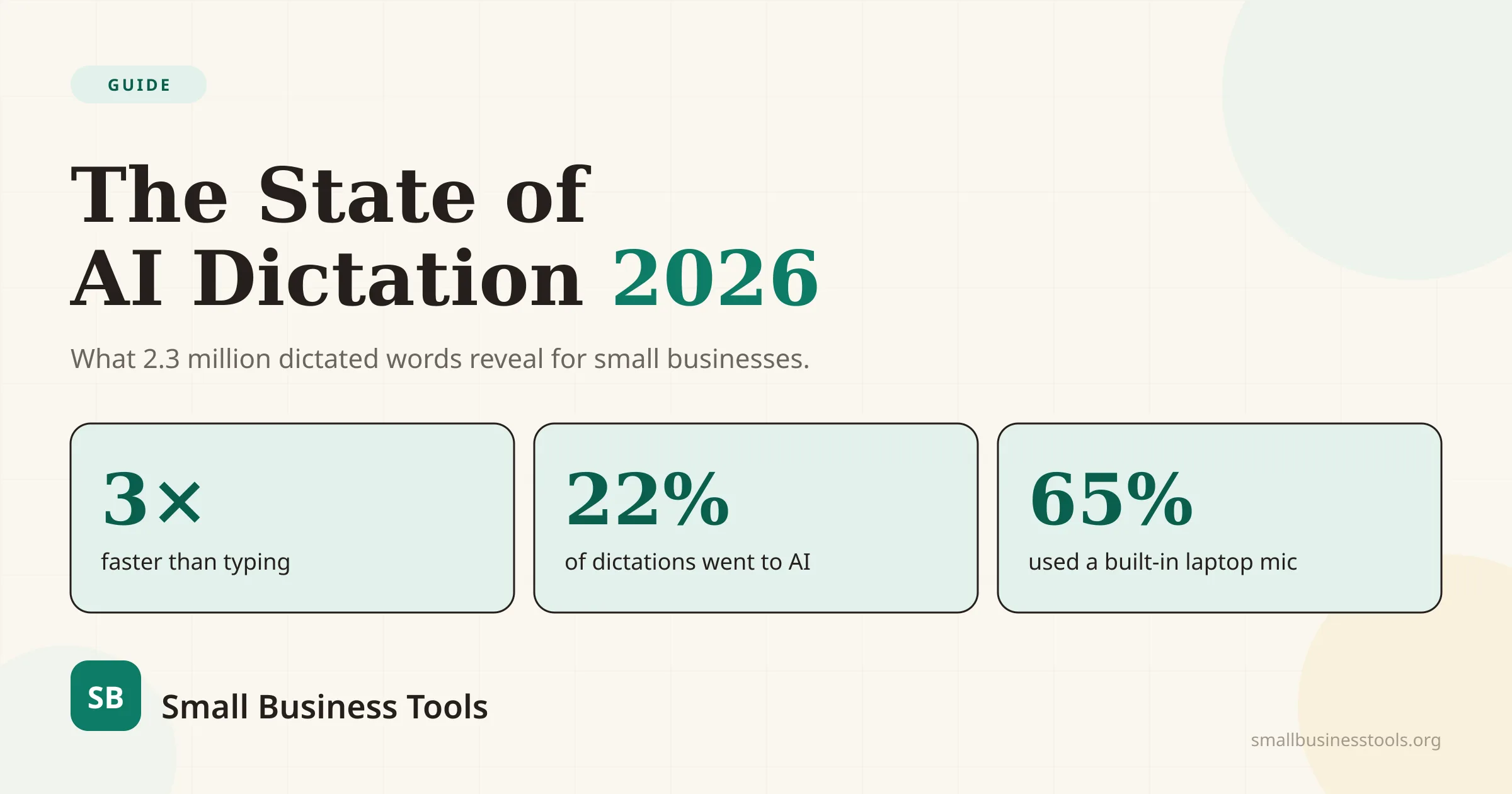
That matters for small business owners for a simple reason: you write all day. Client emails, proposals, support replies, CRM notes, social captions, and — increasingly — prompts to ChatGPT and Claude. The controlled Stanford, University of Washington, and Baidu study that found English speech input roughly three times faster than smartphone typing was a lab result. This report is what that speed looks like in a real workweek. Below are the seven findings we think are worth stealing, and what each one means for the way you work.
One honest caveat up front: this is Voibe's own opted-in user base, not a random, representative survey. Voibe skews toward Mac, developers, and privacy-minded users, so treat the shares as a strong directional signal rather than a census of all small businesses. The behavioral patterns still travel well — they line up with how anyone drafting a lot of text tends to use voice.
Key takeaways
- Voice is now how people talk to AI. AI assistants took 22% of all dictations and 31% of all words — more than email and chat combined. People dictate into an AI app 2.3× longer than into an email.
- Dictation ran about 3× faster than typing — a median of 122 words per minute against the 40 wpm most people type. Across the sample, one month of spoken words would have taken roughly 572 extra hours to type.
- The barrier to entry is basically zero. 65% of people used the microphone built into their laptop. No gear, no setup.
- Developers dictate the most — 17% of people produced 24% of all dictations — which says a lot about how solo founders and agencies now build.
- People are getting more comfortable fast: average dictation length grew 28% in five months.
- Privacy is a setting you control, split roughly 57% zero-retention cloud and 43% fully on-device among users who could choose.
What the report actually measured
The data covers August 2026: 507 people who dictated at least once, 89,791 total dictations, 2,324,885 words, and 428 distinct destination apps. It's aggregate only — no transcript content, window titles, or browser tabs were read — and speed figures were measured on English dictations of 20+ words within a normal speaking range. Non-space-delimited languages (Japanese, Chinese, Korean) were excluded from the word-count figures.
None of the numbers below are our estimates. They're the report's, and we've linked it in full at the end so you can check any of them.
1. Voice has become how people talk to AI
The headline finding isn't about dictation replacing your keyboard for documents. It's where the words go. AI assistant apps — Claude, ChatGPT, and others — accounted for 22% of all dictations and 31% of all dictated words. Claude alone took 16% of dictations and 24% of words, more than email (6%) and chat apps (5%) put together.
And people say far more to a machine than to a person. The average dictation broke down like this by destination:
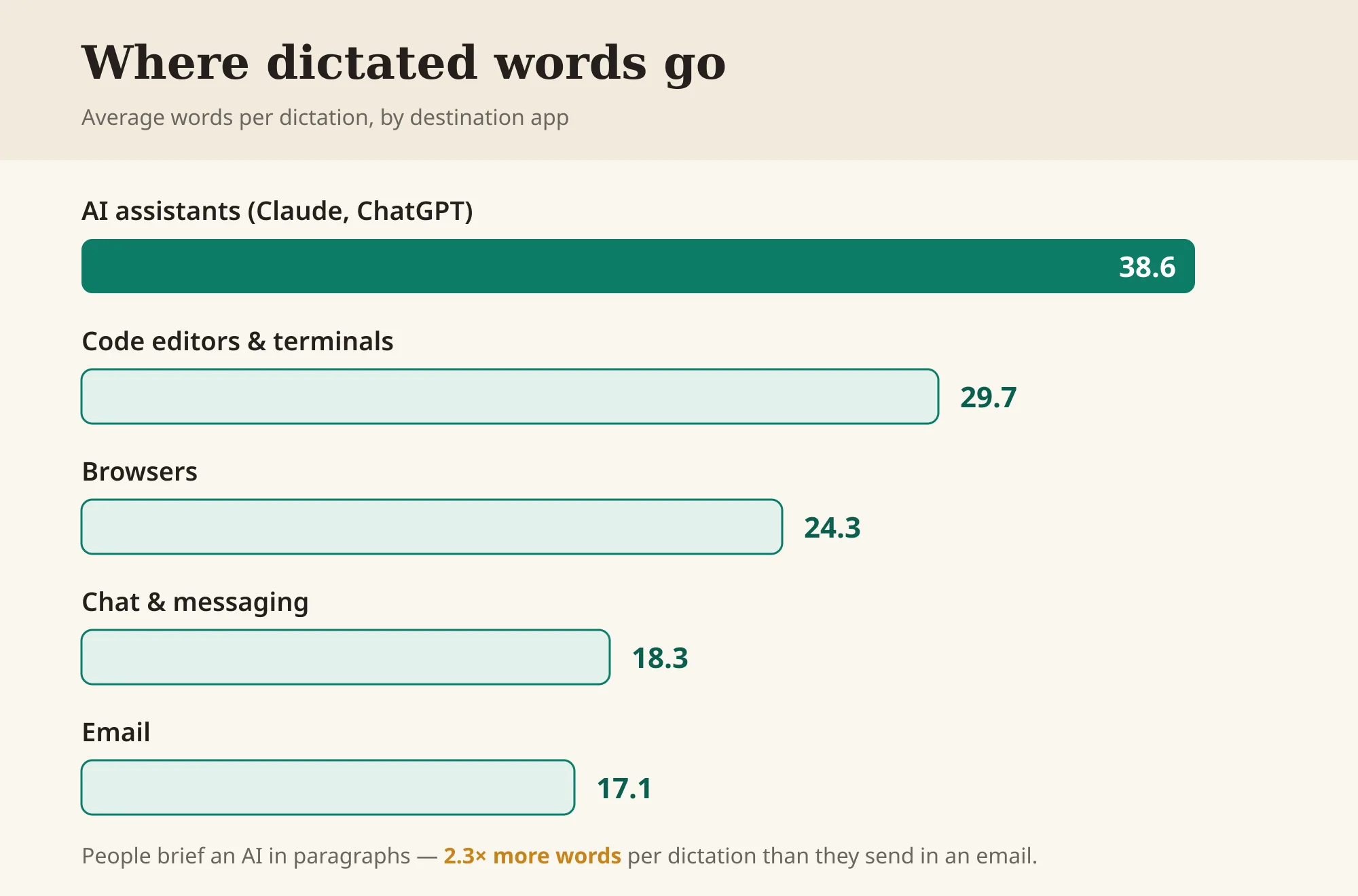
That's a 2.3× gap between a prompt and an email. The report's explanation is the useful part: when a paragraph takes 20 seconds to say instead of two minutes to type, detail gets cheap. People brief an AI in full paragraphs — context, constraints, tone — because it no longer costs them anything to.
Why it matters for you: if you use AI to draft proposals, replies, or marketing copy, the quality of the output is capped by the quality of your prompt. Typing a rich prompt is tedious, so most people type a thin one and get a generic answer back. Speaking the prompt removes that friction, and a better brief in gets a better draft out. This is the single most transferable lesson in the report: the fastest way to get more from an AI tool is to tell it more, and voice is what makes telling it more feel free.
2. Dictation ran about 3× faster than typing
The median dictation clocked in at 122 words per minute. The average computer user types around 40. That works out to the median dictation being 3.05× faster than typing, and the median *person* 2.7× faster (people pause and think mid-dictation, so per-person speed is lower than raw speech speed). Even measured against a fast 80-wpm typist, dictation still came out about 1.5× quicker.
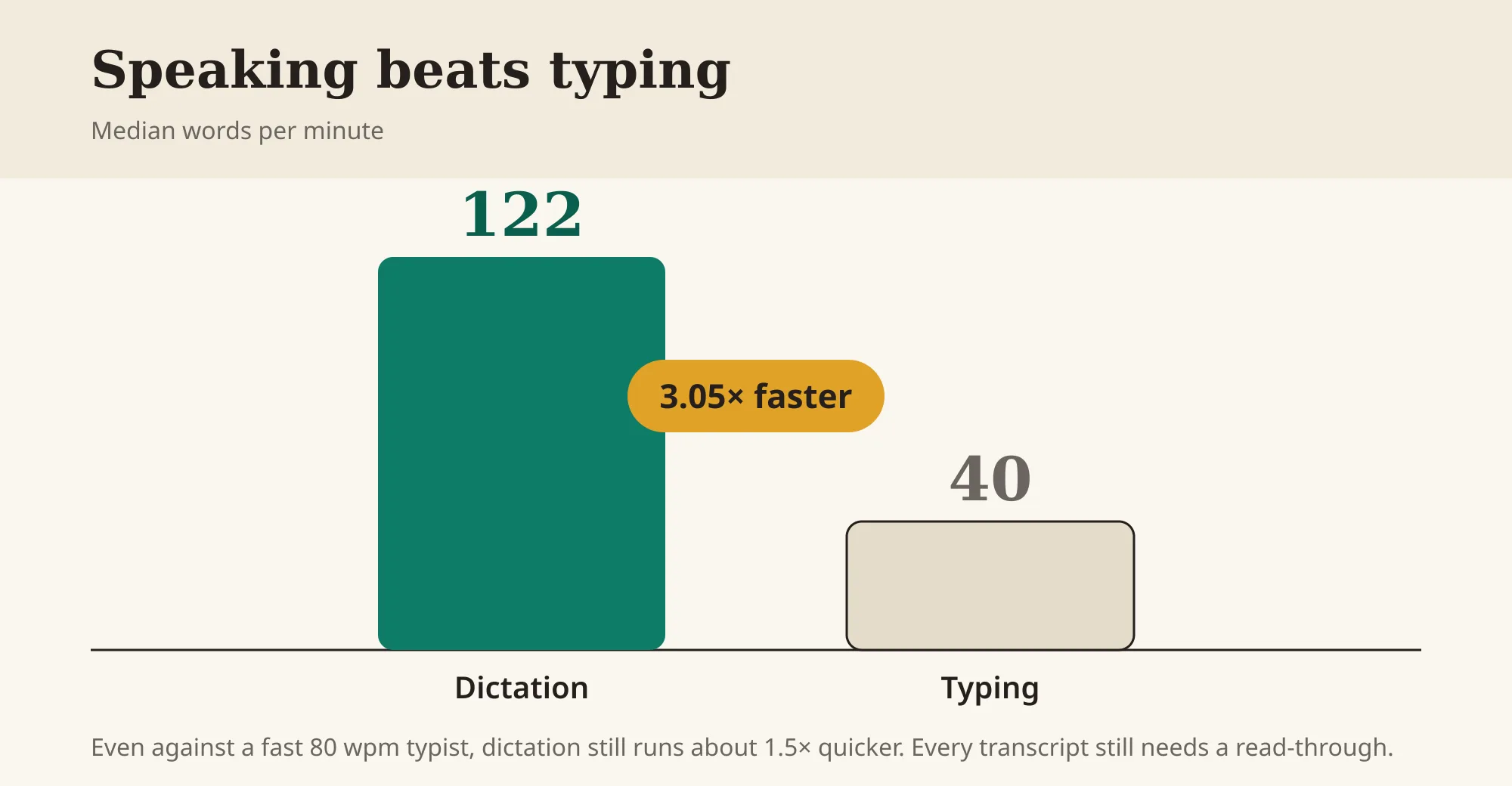
Scaled up, the sample's 2,324,885 words took 397 hours to say. Typed at 40 wpm, the same words would have taken roughly 969 hours — a difference of about 572 hours in a single month.
Why it matters for you: the 572 hours is spread across the whole sample, so don't read it as "everyone saves 15 hours a week." The honest framing is that the time saved scales with how much you write. If you're a freelancer or agency owner clearing a big inbox, writing quotes, and prompting AI all day, you're on the heavy end of that curve and the minutes add up into real hours. If you dictate twice a week, you'll save a little. Either way, the gap is large enough that it's worth finding out where you land — every transcript still needs a read-through, but a fast first draft is most of the work.
3. The barrier to entry is basically zero
You might assume serious dictation requires a good microphone. The data says otherwise: 65% of people (331 of 507) dictated through the microphone built into their laptop — mostly MacBook Pros and Airs. Dedicated USB mics like the Blue Yeti were a rounding error.
The usage pattern is just as low-commitment. The median dictation was 15 words and 8 seconds — not an essay, a sentence. People dictate in short bursts, over and over: half of all dictations were followed by another within 60 seconds. Nobody sat down to "record." They pressed a shortcut, said a line, and kept working.
Why it matters for you: there's no equipment purchase, no studio, and no learning curve to test this. If you own a laptop from the last few years, you already have everything you need to try dictation on your next email. Start with the low-stakes stuff — a Slack message, a quick note — before you trust it with a client proposal.
4. The "developer paradox": builders dictate the most
You'd expect the people most comfortable typing to dictate the least. The opposite was true. Developers were 17% of people but produced 24% of all dictations — about 255 dictations each over the month, against roughly 121 for people mainly using AI apps. Code editors and terminals (VS Code, Cursor, Warp) were the single biggest destination category at 24% of all dictations.
Why it matters for you: this is really a story about how solo founders, indie hackers, and small agencies build now. A lot of "coding" in 2026 is describing what you want to an AI assistant inside an editor — and describing is faster spoken than typed. If you're a one-person software business or a small studio shipping client sites, the people who look most like you in this data are dictating constantly. It's a signal that voice isn't just for writing prose; it's for instructing tools.
5. People get more comfortable fast — and it compounds
Dictation length grew steadily over five months, from an average of 20.3 words per dictation in March to 25.9 in August — a 28% increase. As people trusted the transcription more, they said more in one go instead of typing corrections.
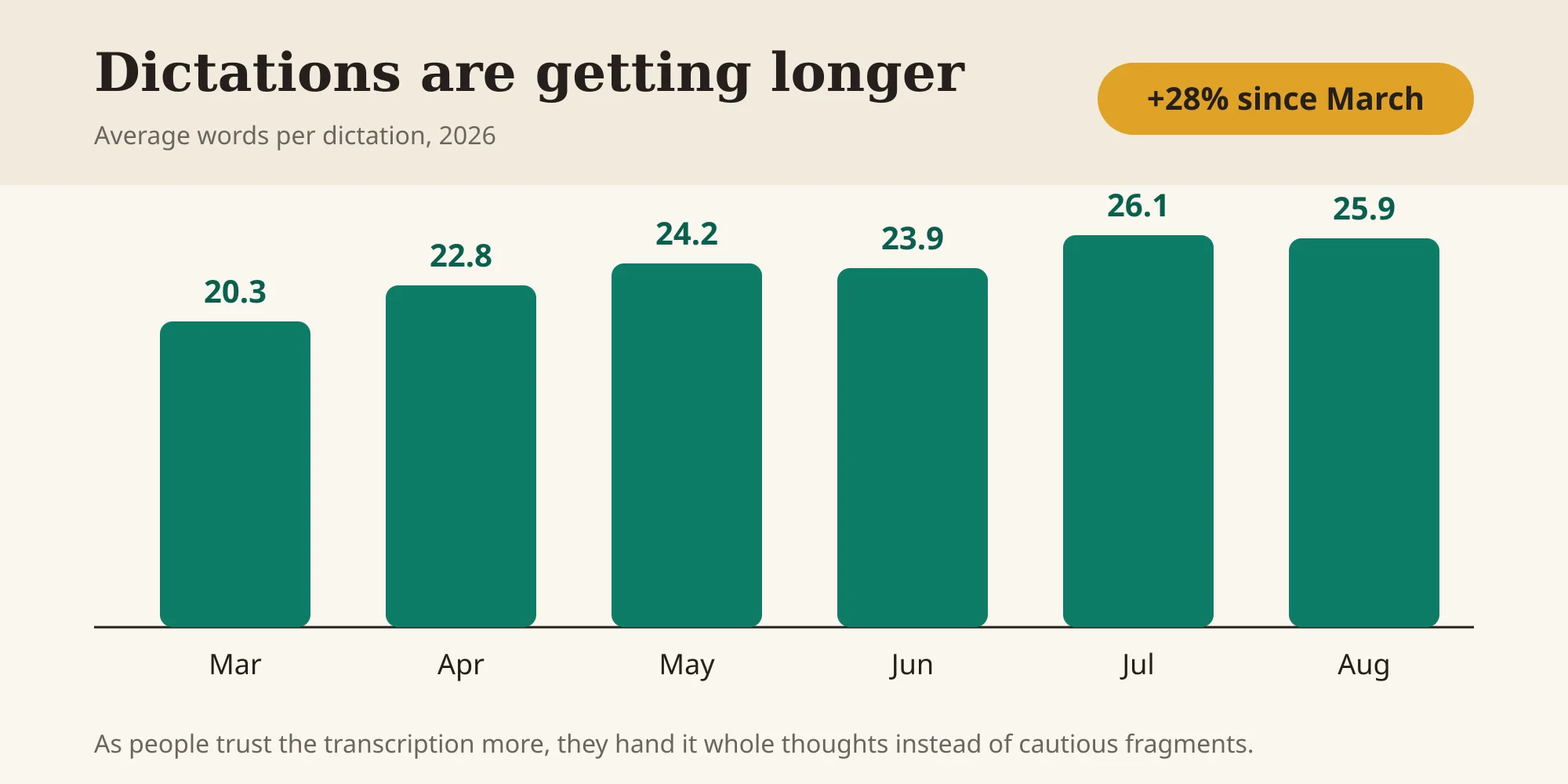
Why it matters for you: the first week of dictation is the worst week you'll have with it. Early on you'll over-correct, speak in short safe fragments, and wonder if it's worth it. The trend in this data is that confidence builds quickly, and as it does, the tool gets more useful — you start handing it whole thoughts instead of cautious sentences. If you try it and bounce off in two days, you're quitting before the payoff. Give it a couple of weeks of real use.
6. Detail gets cheap — so your AI output gets better
This is the flip side of insight #1, and it's worth its own line because it's the most actionable thing here. The reason AI apps got 38.6 words per dictation while emails got 17.1 isn't that AI needs more words. It's that people finally *give* more words when giving them is easy.
A thin prompt — "write a follow-up email to a client" — gets a thin, generic result. A spoken prompt is naturally richer: "write a follow-up to a client who went quiet after I sent a quote for a kitchen remodel, friendly not pushy, remind them the quote holds for 30 days, and offer to jump on a quick call." That second version takes 15 seconds to say and 90 seconds to type. Most people won't type it. Almost everyone will say it.
Why it matters for you: if you've been unimpressed by AI writing tools, the problem may be input, not the model. Try dictating your next prompt into a tool like our AI Email Writer or Content Writer and notice how much more context you volunteer when you're talking. Then clean up the draft it returns — the Paraphrasing Tool is handy for tightening the parts that came out too wordy.
7. Privacy is a setting you actually control
For the users whose engine was tagged, dictations split roughly 57% zero-retention cloud and 43% fully on-device. On-device means audio and transcript never leave the machine — the most common on-device setup was a local Whisper model running entirely on Apple Silicon.
Why it matters for you: small businesses dictate sensitive things — client financials, health details, staff issues, unreleased product plans. The reassuring finding is that a meaningful share of users chose processing that keeps that content on their own device, and it's a real toggle in modern tools, not a marketing promise. If you handle regulated or confidential information, this is your first checklist item: confirm whether a tool offers on-device or zero-retention cloud processing before you dictate anything you wouldn't email to a stranger. We break down which tools do what in our best AI dictation tools guide.
What to do this week
You don't need a plan to test this — you need one shortcut and a week. A realistic on-ramp:
- Turn on dictation you already have. Apple Dictation and Windows Voice Access are free and built in. Use them for a day on low-stakes text — Slack messages, quick notes — to get past the awkward first hour.
- Point it at your biggest text chore. For most owner-operators that's email or AI prompts. Dictate one client email and one AI prompt, then edit the result. Time both against typing.
- Dictate richer AI prompts on purpose. Say the context you'd normally skip. Compare the draft to what a one-line prompt gives you.
- Check the privacy setting before anything confidential. On-device or zero-retention cloud for client and financial details.
- Give it two weeks before you judge it. The report's own trend shows the payoff arrives after the awkward start, not during it.
If you decide it's worth a dedicated tool, weigh a one-time purchase against a subscription the way you would any daily input device — our best AI dictation tools and Wispr Flow alternatives guides compare the current options on privacy, platforms, and long-term cost.
A realistic example
Say you run a two-person web studio. On a normal day you write three client emails (~500 words), two AI prompts to draft a proposal and a scope doc (~400 words), and a batch of CRM notes and Slack messages (~600 words). That's about 1,500 words of typing — roughly 38 minutes at 40 wpm.
Dictate the same 1,500 words at a conservative 110 wpm and you're speaking for about 14 minutes. Add generous editing time — voice drafts always need a cleanup pass — and call it 25 minutes end to end. That's ~13 minutes back on an ordinary day, and more on a heavy one. Over a working month that lands in the range the report describes: not life-changing on any single day, but a steady hour or two a week returned to billable work instead of typing.
The bigger win is usually the one that doesn't show up on a stopwatch — the proposals that come out better because you finally gave the AI the full context, out loud, that you never had the patience to type.
Caveats worth keeping in mind
- It's one vendor's opted-in users, not a representative sample. The category shares (developers, AI apps, Mac) reflect who chooses Voibe. Read them as directional.
- Speed is not accuracy. 122 words per minute in doesn't mean 122 usable words out. Accents, background noise, jargon, and names all affect the result, and every transcript needs review.
- Your savings depend on your volume. The eye-catching aggregate hours are spread across hundreds of users. Heavy writers benefit most; occasional dictators, least.
- Tools and prices change. Confirm any tool's current privacy options and pricing on its own site before you commit.
Sources
- Voibe, State of AI Dictation report (published September 2, 2026) — the source of all usage figures above.
- Stanford, University of Washington, and Baidu speech input study — the controlled research finding speech input roughly three times faster than typing.
FAQs
Is AI dictation really 3× faster than typing?+
In this report, yes — the median dictation ran at 122 words per minute against the 40 wpm an average person types, which is about 3× faster. But that's raw input speed. Per person the gap was closer to 2.7×, and against a fast 80-wpm typist it narrowed to about 1.5×. Every transcript still needs an editing pass, so your real-world savings will be smaller than the raw speed suggests.
What do people dictate into most?+
Not documents. The biggest destination categories were code editors and terminals (24% of dictations), browsers (23%), and AI assistant apps like Claude and ChatGPT (22%). AI assistants also received the longest dictations by far — an average of 38.6 words, versus 17.1 for email.
Do I need a special microphone to dictate?+
No. In the report, 65% of people dictated through the microphone built into their laptop, and dedicated USB mics barely registered. If you have a reasonably recent laptop, you already have enough to start.
Is dictation private enough for client information?+
It can be, if you choose the right setting. Among users who could pick, roughly 43% used fully on-device processing, where audio and transcripts never leave the machine, and 57% used zero-retention cloud, where audio is deleted after transcription. Confirm a tool offers one of those before dictating confidential financial, health, or client data.
Will voice replace my keyboard?+
The useful mental model from the data isn't replacement, it's division of labor: voice handles the first draft — the long email, the detailed AI prompt — and the keyboard handles precision edits, sensitive numbers, and unusual names. People dictate in short, frequent bursts and switch back to typing constantly, using each for what it's best at.
The takeaway
The most important line in the report isn't a speed number — it's where the words went. Voice has become the default way a lot of people talk to AI, because saying a rich instruction is nearly free while typing one is a chore. For a small business, that's the opening: not "type less," but "get more out of the AI tools you already pay for by finally giving them the full context, out loud." Test it this week on one email and one prompt, keep the privacy setting honest, and let the two-week comfort curve do the rest.
Free tools to try
Keep reading
Guide
10 Best AI Dictation Tools in 2026
The best AI dictation tools ranked for privacy, ease of use, support, and long-term cost — including lifetime, local, and free options.
Guide
10 Best Wispr Flow Alternatives in 2026
Compare the best Wispr Flow alternatives for privacy, lifetime pricing, offline use, and platform support — with current prices and honest tradeoffs.
Guide
The Small Business AI Stack: Tools for Every Job in 2026
A practical AI stack for small businesses — the tools that actually save time on marketing, content, SEO, and admin, organized by the job they do. Free where it counts.