Video Marketing
Shot.video
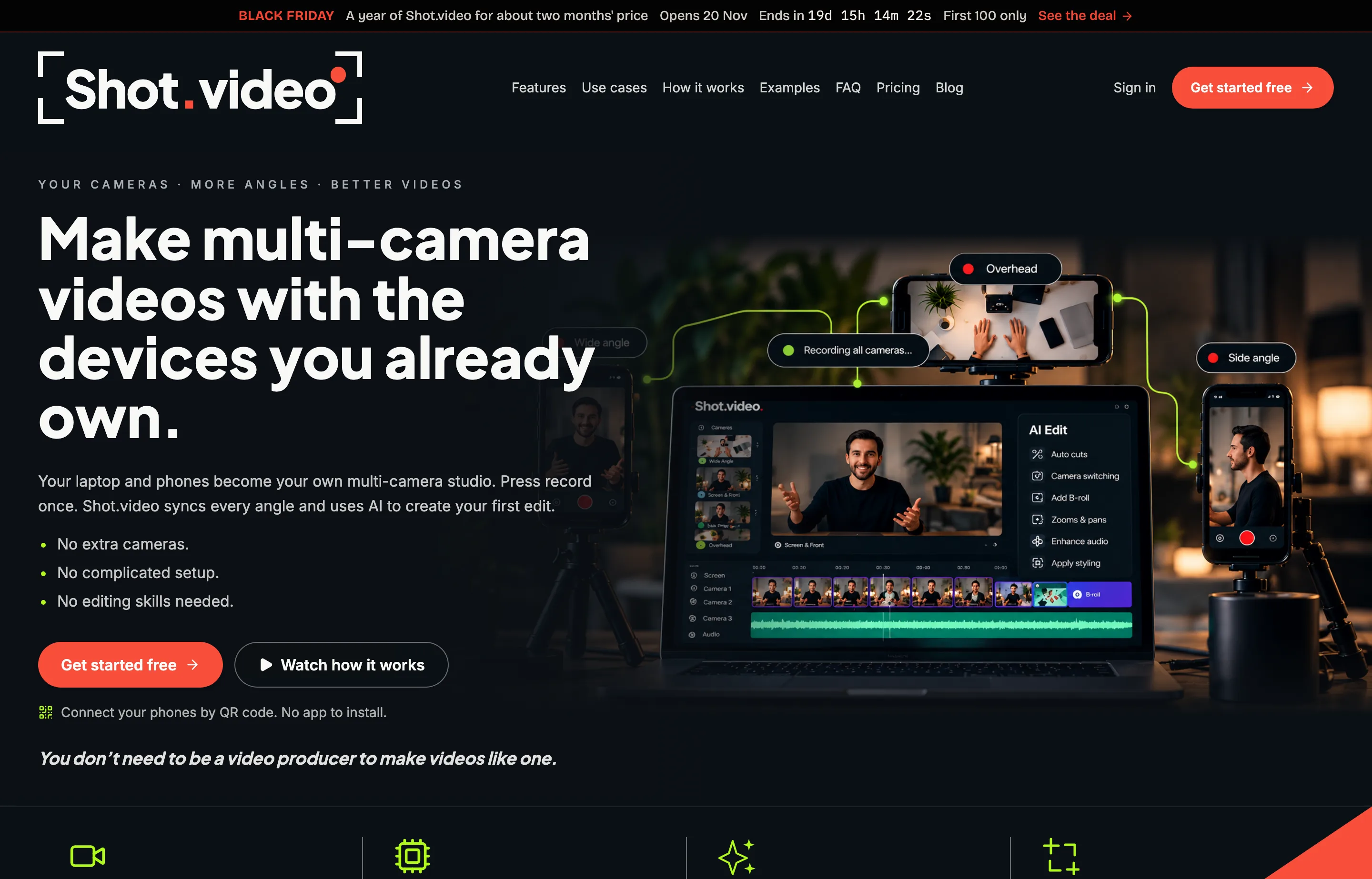
Shot.video turns the devices you already own into a multi-camera studio. Scan a QR code and a phone becomes another camera angle; the laptop camera and screen join the same recording. You press record once, every angle records in sync, and AI produces a first edit that cuts between cameras, zooms into the part of the screen that matters, and suggests B-roll.
The point is not better editing software — it is a kind of video you would not otherwise shoot. A product demo with a presenter angle, a screen angle, and a close-up normally needs a second person and a sync step. Shot.video's bet is that a solo owner will make the video at all if the setup is one QR code and the first cut is already done.
It appeared on Product Hunt on 11 November 2026. Rank and points could not be verified this run because Product Hunt's leaderboards were unreachable; treat the launch as a signal that the product is new, not as a quality score. It is built by founder Ian Naylor and sits within the Brellaco group, per the site's own story page.
- Website
- shot.video
- Category
- Video Marketing
- Pricing
- Free plan + paid tiers
- Starts at
- Free (starter credits); Creator $19/month
- Best for
- Solo founders and creators making product demos, tutorials, and talking-head videos without a film crew.
- Profile updated
- November 12, 2026
Independent profile — no affiliate links or sponsored placement.
Key features
- Multi-camera recording: connect one or more phones by QR code, with no app to install, alongside the laptop camera and screen
- Single-button, synchronized recording across every connected device and audio source
- AI editing that switches between angles, adds screen zooms and pans, and suggests B-roll cutaways you approve
- Screen styling options: clean capture, browser frame, or a 3D showcase treatment
- Microphone handling: the laptop mic runs under every shot, and a phone's mic takes over when it is closer to the speaker
- Every AI choice stays editable — change the shot, trim the B-roll, recrop the screen
- Use-case templates and examples for product demos, courses, tutorials, reviews, team updates, and podcasts
- Share-ready output from one recording session; no separate sync or multicam assembly step
Pricing
Read from Shot.video's pricing page on 12 November 2026 (verify current):
- Free — $0. Two Video Credits and five B-roll Credits as a one-time allowance. Uploading your own B-roll and manual edits and downloads are free.
- Creator — $19/month billed monthly. 20 Video Credits and 25 B-roll Credits per month, with rollover up to three times the monthly amount.
- Pro — $39/month billed monthly. 60 Video Credits and 100 B-roll Credits per month, same rollover.
- Studio — $79/month billed monthly. 150 Video Credits and 250 B-roll Credits per month.
Video Credits pay for AI edits; B-roll Credits pay for generated images and clips. Annual billing gives two months free. One-off credit packs are also sold — for example 5 Video Credits for $9, 10 for $16, 20 for $29, and B-roll packs from 100 credits for $9.
Pros and cons
Pros
- No extra hardware and no app install — the phones in your pocket become angles
- The AI first cut removes the blank-timeline problem that stops most people editing
- Editable output means it is a starting point, not a black box
- Clear, low entry price at $19/month for a solo creator
Cons
- Credit pricing is hard to forecast: a long take with several regenerations eats credits quickly
- Brand new (launched November 2026), so there is no track record on reliability or export formats
- Browser-based multicam depends on every phone staying connected and awake
- Less editing control than a full editor such as Descript or Premiere when you want frame-level work
Who should use Shot.video?
Shot.video is for the founder or creator who already knows video would sell the product but keeps postponing it because the shoot is fiddly. If your format is a talking head plus screen plus a detail shot — demos, tutorials, course lessons, unboxings — it collapses the setup to one recording.
Skip it if you need a professional edit with colour grading, motion graphics, and multi-track audio, or if your videos are assembled from existing footage rather than recorded fresh. A dedicated editor or a freelance editor is the better spend there.
Evidence, honestly: the only launch evidence available this run is its Product Hunt listing on 11 November 2026, with no rank or points verified. That is community attention, not reviews; there is no G2 or Capterra history yet.
FAQs
Is there a free Shot.video plan?+
Yes. The free plan includes two Video Credits and five B-roll Credits as a one-time allowance, and uploading your own B-roll plus manual edits and downloads stay free. Paid plans start at $19/month for 20 Video Credits and 25 B-roll Credits per month.
What is a Video Credit?+
A Video Credit pays for an AI edit or regeneration; B-roll Credits pay for AI-generated images and clips. Creator includes 20 Video Credits monthly, and unused credits roll over up to three times the monthly allowance. Credit packs can be bought separately and do not expire.
Do my phones need an app to become cameras?+
No. You scan a QR code in the browser and the phone joins the recording as another angle. That also means each phone needs to stay on the same session with a stable connection and enough battery for the length of the take.
Shot.video or Descript?+
Shot.video for recording a multi-angle video from scratch with almost no setup. Descript for editing existing footage, transcript-based cuts, and polished post-production. They solve different halves of the job; some creators will record in Shot.video and finish elsewhere.
Similar tools in the directory
Video Marketing
Topview
E-commerce and DTC small brands that need product and ad videos every week without hiring an editor or learning After Effects.
Video Marketing
Jupitrr
Coaches and consultants who post talking-head Shorts, Reels, and TikToks.
Video Marketing
ScreenCursor
SaaS makers recording in-browser demos who want auto zoom without a subscription.
Free tools to try
Keep reading
Guide
The Small Business AI Stack: Tools for Every Job in 2026
A practical AI stack for small businesses — the tools that actually save time on marketing, content, SEO, and admin, organized by the job they do. Free where it counts.
Guide
What Outbid.lol Teaches Small Businesses About Viral Growth
Outbid.lol's reported $178k-in-77-hours launch shows small businesses how to create viral opportunities without mistaking one spike for a strategy.