AI Notetakers
Oats
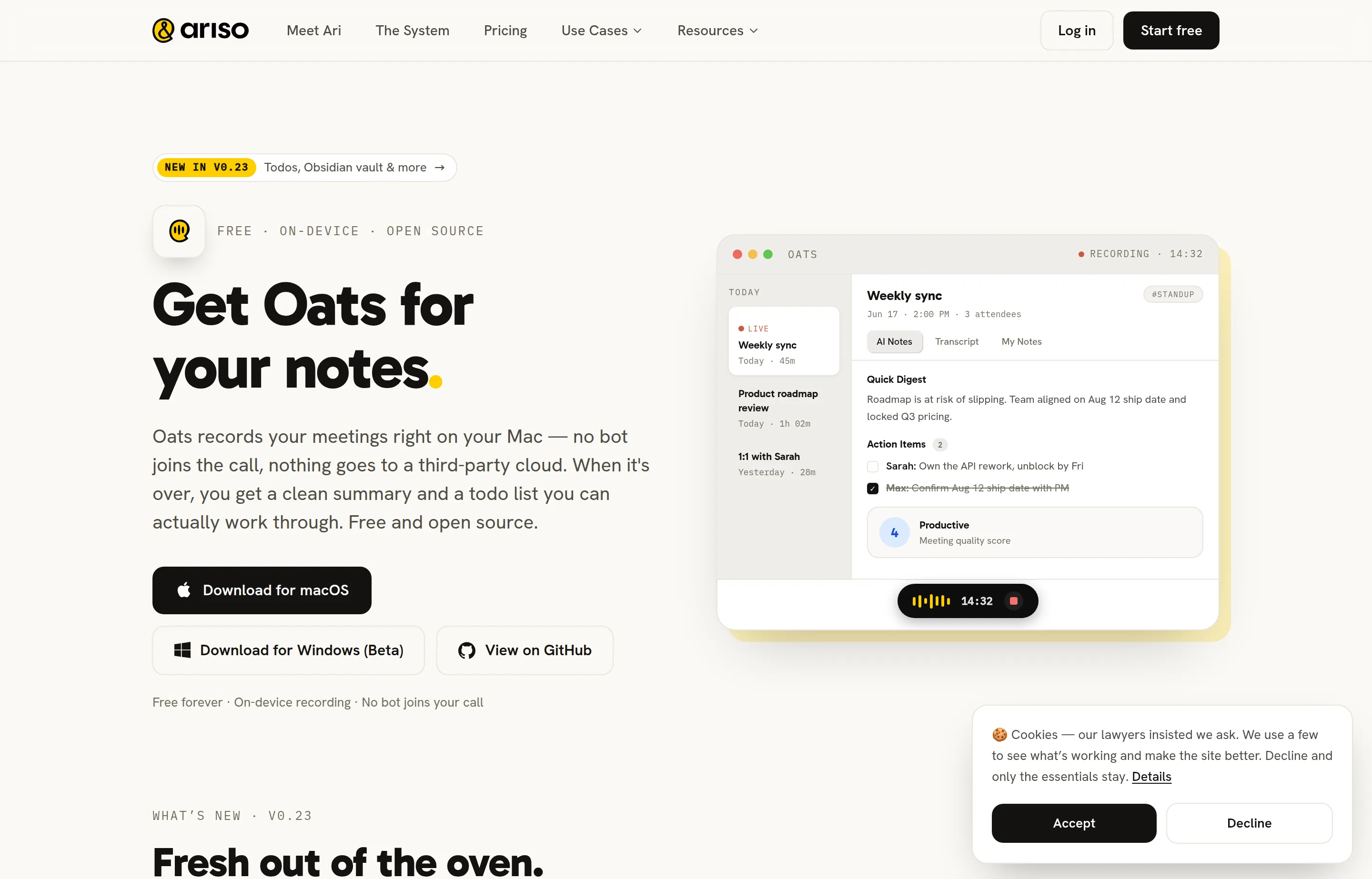
Oats is a free, open-source AI meeting notetaker from Ariso. It records from your computer’s audio — Zoom, Meet, Teams, a phone call, even a hallway chat — without inviting a bot into the call. When the meeting ends, you get a quick digest, structured summary, per-person action items, and a meeting quality score. Local backend notes land as plain Markdown (Obsidian-friendly tasks), so you are not trapped in a proprietary doc.
It launched on Product Hunt on September 14, 2026 at #5 of the day with 238 points and 68 comments. The pitch is blunt: meeting notes became a utility, and utilities should be free, inspectable, and private by default. You can run transcription and summaries fully on-device, or sign into the Ariso cloud backend for richer features (speaker tagging, multi-language, follow-up tracking, and more) while the product still claims it will not train on your meeting data.
Compared with Fireflies-style bots, Oats wins on presence and ownership: nothing joins the calendar invite as a creepy “Notetaker.” Compared with pure SaaS notetakers, the tradeoff is desktop install, local model setup if you stay offline, and a product that is still shipping weekly (v0.23 added Todos + Obsidian vault wiring). Windows is listed as beta; macOS is the primary download.
- Website
- ariso.ai
- Category
- AI Notetakers
- Pricing
- Free
- Starts at
- Free forever
- Best for
- Teams that want meeting notes without a bot in the call or a SaaS seat tax
- Profile updated
- September 15, 2026
Independent profile — no affiliate links or sponsored placement.
Key features
- No bot joins the call — Captures system audio on your machine instead of injecting a participant into Zoom/Meet/Teams.
- On-device or Ariso cloud AI — Run recording + transcription + notes locally, or connect an Ariso account for cloud transcription and enhanced features.
- Structured outputs — Quick digest, full summary, action items with owners, and a meeting quality score.
- Todos that sync with notes — Action items collect in a Todos tab; closing one in notes closes it there (local Obsidian Tasks support on the local backend).
- Obsidian / Markdown storage — Local notes are plain Markdown in a vault you choose — export, sync, or leave without a proprietary lock-in.
- Searchable meeting library — Ask questions across past meetings (“what did we decide about pricing?”).
- Open source (MIT) — Full GitHub repo to audit, fork, or self-host; downloads for macOS and Windows (beta).
- Speaker tagging (cloud) — Match voices to people on the Ariso backend so notes say names instead of “Speaker 2.”
Pricing
Read from Oats's pricing page in September 2026 (verify current).
Oats itself is free forever — no seats, no trial timer, no paywall after meeting six. Both the local on-device path and the Ariso cloud transcription path are described as free on the product site and GitHub README. There is no separate Oats SKU with a monthly sticker price; enhanced cloud features ride the Ariso account, and Ariso’s broader “Ari” suite has its own startup/commercial packaging elsewhere on ariso.ai if you expand beyond Oats.
Practical cost is hardware and time: local models need enough Mac/PC resources, and Windows is still beta. If you need enterprise SSO, guaranteed SLA, or a hosted bot that works when your laptop is closed, budget for a different vendor — Oats is intentionally the opposite product.
Pros and cons
Pros
- Truly free + open source with a no-bot recording model most SaaS notetakers will not match.
- Local Markdown / Obsidian path is excellent for privacy-sensitive and FOSS-minded teams.
- Action items → Todos loop treats notes as work, not archive sludge.
Cons
- Desktop-bound — Closing the laptop mid-process can pause work; audio queues for later, but this is not a cloud bot that keeps listening without you.
- Local quality vs cloud — On-device diarization and summary quality will trail heavy cloud models on hard audio; speaker tagging is cloud-first today.
- Early product surface — Editing generated notes, custom local models, and screen recording were still roadmap/PH discussion items around launch — expect rough edges.
Who should use Oats?
Choose Oats if you hate meeting bots, care about on-device privacy, want Markdown you control, and are fine installing a Mac (or Windows beta) app. It is a strong fit for startups, agencies, and security-conscious teams that already live in Obsidian or plain files.
Look elsewhere if you need a calendar bot for meetings you do not attend, mandatory admin controls across hundreds of seats, or polished mobile capture. Pairing with something like Ulpaso or Ify only makes sense if your stack needs adjacent AI workspace tools — Oats itself is the notetaker layer.
FAQs
Is Oats really free?+
Yes for the app: free forever, open source, no card for local use. Cloud backend features via Ariso are also positioned as free for Oats; confirm any Ariso account limits in-product as the suite evolves.
Does a bot join my Zoom/Meet/Teams call?+
No. Oats listens to audio on your computer. Participants never see a notetaker avatar in the roster.
Where do my notes live?+
On the local backend, as Markdown in a vault you choose (Obsidian-friendly). You can also download/export recordings and notes. Cloud mode stores transcripts in your Ariso account per their backend.
Can I use my own local models?+
The team said custom local model support is planned. Today you use the bundled on-device path or Ariso cloud — check GitHub releases for the latest.
Similar tools in the directory
AI Notetakers
Ulpaso
Mac-using consultants and founders whose calls include sensitive details and who want notes as plain files they own forever.
Customer Support
ify
Small support teams already on Freshdesk, Zendesk, Salesforce, or HubSpot who want AI that resolves tickets, not just drafts replies.
AI Notetakers
TwinMind
Solo operators who want meeting notes plus a searchable memory across every device.
Free tools to try
Keep reading
Guide
10 Best AI Dictation Tools in 2026
The best AI dictation tools ranked for privacy, ease of use, support, and long-term cost — including lifetime, local, and free options.
Guide
The Small Business AI Stack: Tools for Every Job in 2026
A practical AI stack for small businesses — the tools that actually save time on marketing, content, SEO, and admin, organized by the job they do. Free where it counts.
Guide
Free Small Business Tools (No Signup): The Complete List
A directory of free small business tools — pricing calculators, invoicing, marketing, SEO, and writing. No signup, no paywall, and they explain the math.